Introduction
- The JS7 - Identity Services provide integration with LDAP Directory Services for authentication and authorization.
- The LDAP Identity Service is a built-in service available from JOC Cockpit
Identity Service Type
The following integration levels are available from Identity Service Types that can be used with LDAP:
| Identity Service | Identity Service Configuration Items | JOC Cockpit Configuration | ||||
|---|---|---|---|---|---|---|
| Service Type | Built-in | User Accounts/Passwords stored with | User Accounts/Passwords managed by | Roles/Permissions stored with | Roles->User Accounts Mapping managed with | Roles Mapping |
| LDAP | yes | LDAP Server | LDAP Server | JS7 Database | LDAP Server | Mapping of LDAP Security Groups to JOC Cockpit Roles performed with the LDAP Server |
| LDAP-JOC | yes | LDAP Server | LDAP Server | JS7 Database | JOC Cockpit | Mapping of user accounts and roles with JOC Cockpit |
Explanation:
- Service Type:
LDAP- Management of user accounts and passwords is performed by the LDAP Server.
- In addition, an automated mapping of membership in LDAP Security Groups to the JOC Cockpit roles takes place.
- The JOC Cockpit does not know any user accounts, passwords and role assignments as this information is managed by LDAP only.
- Service Type:
LDAP-JOC- Management of user accounts and passwords is performed by the LDAP Server.
- The assignment of roles to user accounts is performed by the JOC Cockpit and is stored in the JS7 database.
- The JOC Cockpit knows user accounts and role assignments. The JOC Cockpit does not know passwords as this information is managed by LDAP only
Identity Service Configuration
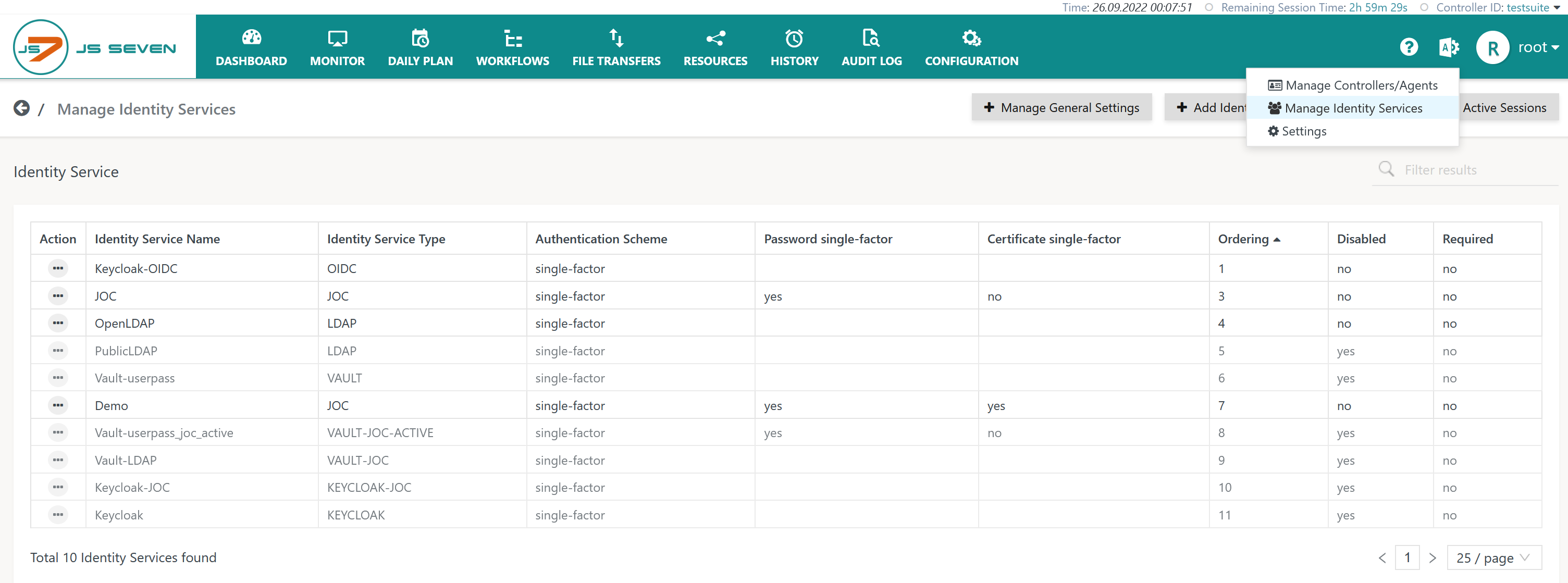
The  icon in the JOC Cockpit main menu is used to select the Manage Identity Services page:
Add Identity Service
To add an Identity Service use the button Add Identity Service from the page above that lists the available Identity Services:

The remaining input fields for the popup window will look like this:

Explanation:
- The
Identity Service Nameis a unique identifier that can be freely chosen. - The
Identity Service Typecan be selected as available from the matrix described above. - The
Orderingspecifies the sequence in which a login is performed with available Identity Services. - The
Requiredattribute specifies whether a login with the relevant Identity Service is required to be successful, for example, if a number of Identity Services are triggered on login of a user account. - The
Identity Service Authentication Schemeallows selection of:single-factorauthentication: user account and password are specified for login with the LDAP Identity Service.two-factorauthentication: in addition to user account and password a Client Authentication Certificate is required, see the JS7 - Certificate based Authentication article for more information.
It is possible to add more than one LDAP Identity Service, for example if different LDAP servers are used or if user accounts and Security Groups are stored in different hierarchy levels with the LDAP server.
Identity Service Settings
Having added an LDAP Identity Service it is necessary to add settings for the LDAP integration from the Identity Service's Manage Settings action menu item:
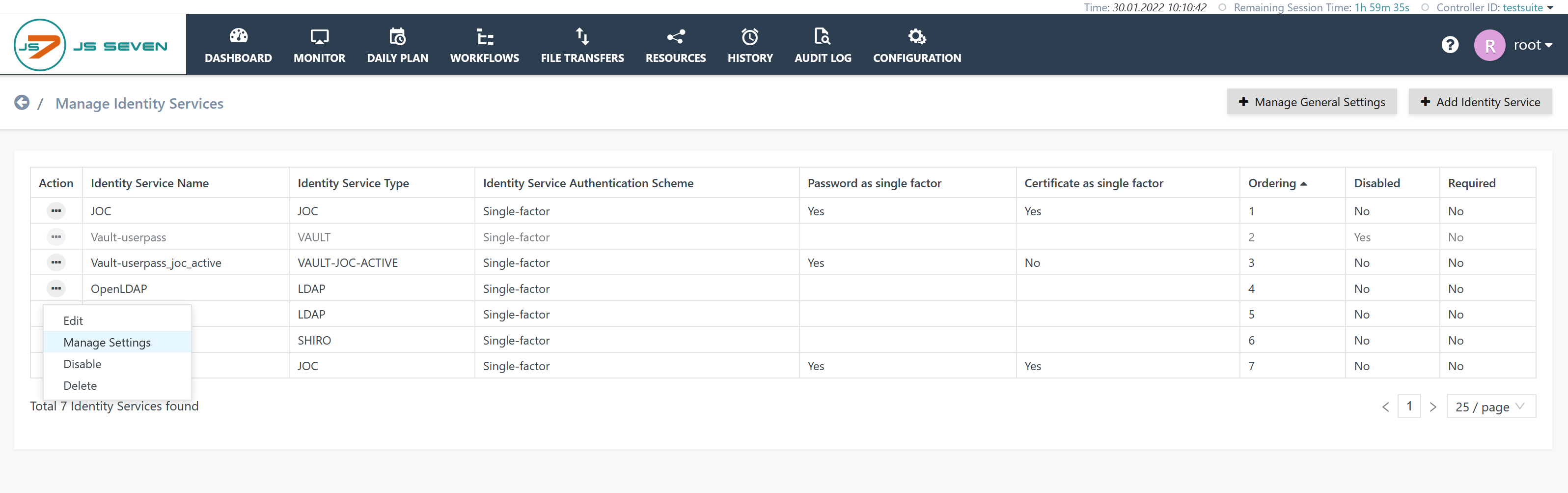
To use the LDAP Identity Service:
- the LDAP Server product has to be installed and has to be accessible for the JOC Cockpit,
- settings are required for configuration in a Simple Mode or Expert Mode.
Simple Mode Configuration
This configuration mode is intended for users who are looking for authentication (not: authorization) with LDAP:
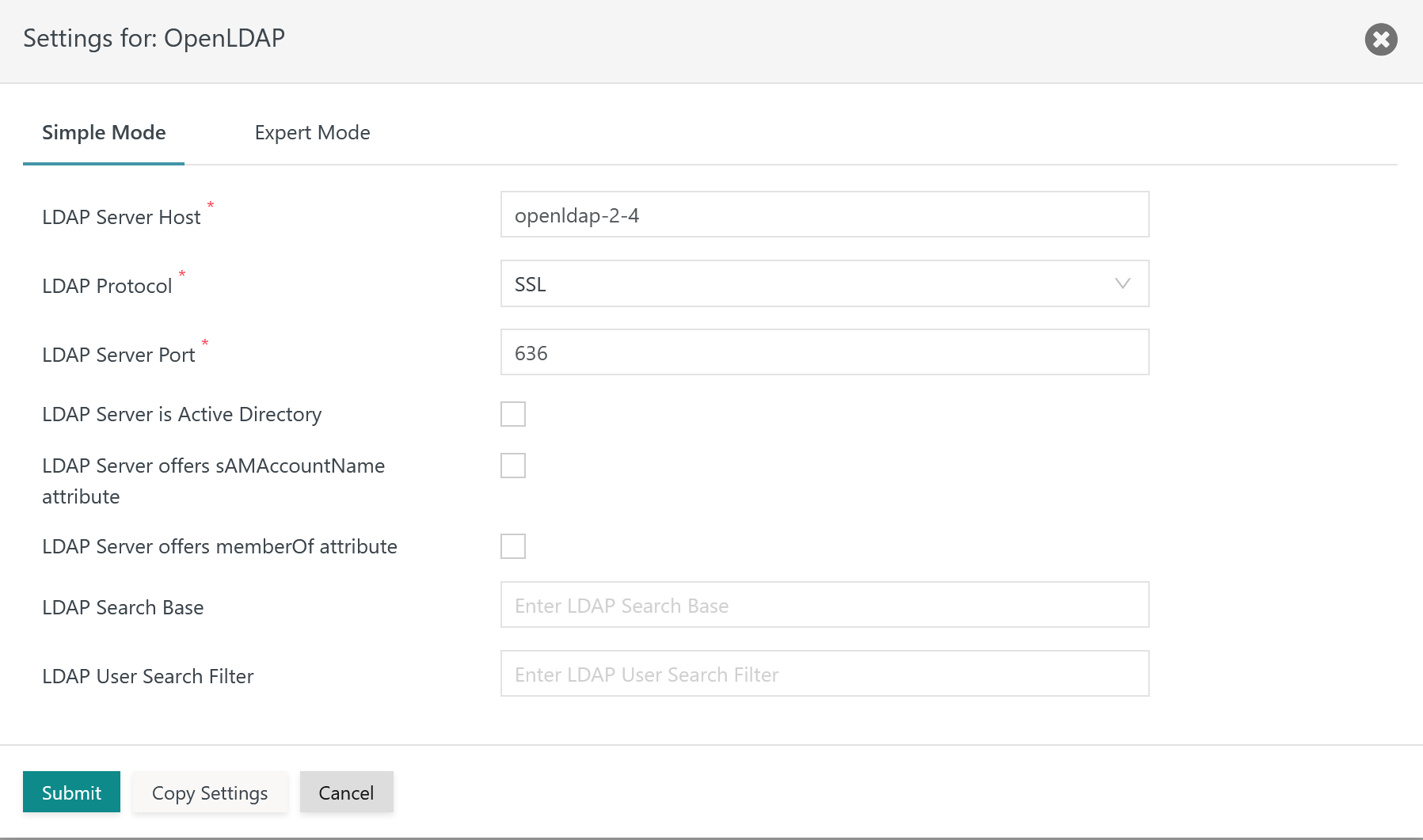
Explanation:
LDAP Server Host: Expects the hostname or IP address of the LDAP Server host. If TLS/SSL protocols are used then the Fully Qualified Domain Name (FQDN) of the host has to be used for which the LDAP Server SSL certificate is issued.LDAP Protocol: The LDAP Protocol can be Plain Text, TLS or SSL. Plain Text is not recommended as the user account and password will be sent through the network without encryption. TLS and SSL protocols are considered as being secure as they encrypt the content/connection to the LDAP Server.LDAP Server Port: The port that the LDAP Server is listening to. For Plain Text and TLS connections port389is frequently used, for SSL connections port636is a frequent option.LDAP Server is Active Directory: This setting simplifies the configuration if the LDAP Server is implemented by Active Directory. A number of attributes for user search and group search are automatically assumed if Active Directory is used.LDAP Server sAMAccountName attribute: ThesAMAccountNameattribute is the unique identifier of a user account. This attribute frequently is available with Active Directory LDAP Servers.LDAP Server memberOf attribute: ThememberOfattribute simplifies the search for Security Groups for which the user account has membership. This attribute frequently is available with LDAP Servers of type Active Directory, however, other LDAP products similarly can implement this attribute.LDAP Search Base: TheSearch Basefor looking up user accounts in the hierarchy of LDAP Server entries, for exampleOU=Operations,O=IT,O=Users,DC=example,DC=com.LDAP User Search Filter: TheUser Search Filterspecifies an LDAP query that is used to identify the user account in the hierarchy of LDAP entries.
Expert Mode Configuration
This configuration mode is intended for users who intend to use LDAP for authentication and authorization:
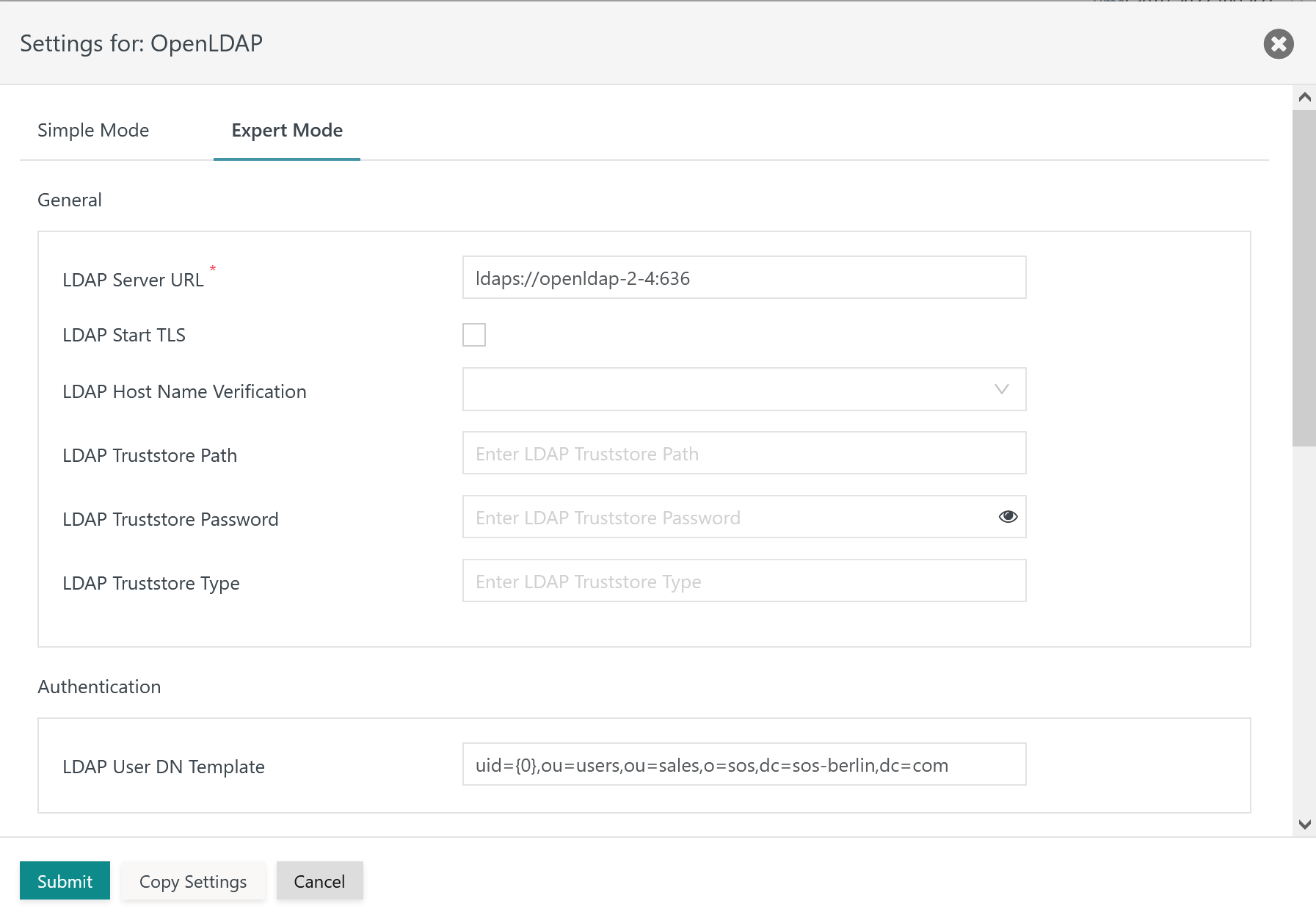
The remaining settings in this mode look like this:

Explanation:
- General
LDAP Server URL: The LDAP Server URL specifies the protocol, e.g.ldap://for Plain Text and TLS connections,ldaps://for SSL connections. The protocol is added the hostname (FQDN) and port of the LDAP Server.LDAP Start TLS: This switch makes TLS the protocol for the connection to the LDAP Server.LDAP Host Name Verification: This switch has to be active to verify if hostnames in theLDAP Server URLand in the LDAP Server certificate match.LDAP Truststore Path: Should the LDAP Server be configured for TLS/SSL protocols then the indicated truststore has to include an X.509 certificate specified for the Extended Key Usage of Server Authentication.- For connections to well known LDAP Identity Providers such as Azure® users should specify the path to the Java
cacertstruststore file that ships with the Java JDK used with JOC Cockpit. - The truststore can include a Private CA-signed Certificate or a Public CA-signed Certificate. Typically the Root CA Certificate is used as otherwise the complete certificate chain involved in signing the Server Authentication Certificate has to be available with the truststore.
- If the LDAP Server is operated for TLS/SSL connections and this setting is not specified then JOC Cockpit will use the truststore that is configured with the
JETTY_BASE/resources/joc/joc.propertiesconfiguration file. This includes use of settings for the truststore password and truststore type. - The path to the truststore is specified relative to the
JETTY_BASE/resources/jocdirectory. If the truststore is located in this directory then specify the file name only, typically with a .p12 extension. Other relative locations can be specified using e.g.../../joc-truststore.p12if the truststore is located in theJETTY_BASEdirectory. No absolute path can be specified and no path can be specified that lies before theJETTY_BASEdirectory in the file system hierarchy.
- For connections to well known LDAP Identity Providers such as Azure® users should specify the path to the Java
LDAP Truststore Password: If an LDAP truststore is used and the LDAP truststore is protected by a password, then the password has to be specified.LDAP Truststore Type: If an LDAP truststore is used then the type of the indicated truststore has to be specified as being eitherPKCS12orJKS(deprecated).
- Authentication
LDAP User DN Template: The Distinguished Name (DN) identifies a user account. The value{0}can be used for Active Directory LDAP Servers and will replaced by the user account specified during login. Alternatively an LDAP query can be specified, for exampleuid={0},OU=Operations,O=IT,O=Users,DC=example,DC=com.
- Authorization
LDAP Search Base: TheSearch Basefor looking up user accounts in the hierarchy of LDAP Server entries, for exampleOU=Operations,O=IT,O=Users,DC=example,DC=com.LDAP Group Search Base: Similarly to theSearch BasetheGroup Search Baseis used to find Security Groups which a user account has membership of. This setting specifies the hierarchy starting from the Security Groups which are looked up.LDAP Group Search Filter: This filter specifies an LDAP query which is used to identify Security Groups the user account is a member of. The filter is applied to search results provided starting from theGroup Search Base.LDAP User Search Filter: This filter specifies an LDAP query that is used to identify the user account in the hierarchy of LDAP entries.LDAP Group Name Attribute: This attribute provides the name of the Security Group that a user account is a member of, for example theCN(Common Name) attribute.LDAP User Name Attribute: This attribute provides the name of the user account, frequently theCN(Common Name) attribute is used.
- Group/Roles Mapping
- The LDAP Group/Roles Mapping is in fact a mapping of Security Groups which the user account is a member of and JS7 roles. Security Groups have to be specified depending on the
LDAP Group Search Attributeas Distinguished Names, e.g.CN=js7_admins,OU=Operations,O=IT,O=Groups,DC=example,DC=com, or as Common Names, e.g.js7_admins.
- The LDAP Group/Roles Mapping is in fact a mapping of Security Groups which the user account is a member of and JS7 roles. Security Groups have to be specified depending on the
Identity Service Configuration Details
The following articles provide detailed information about configuration of an LDAP Identity Service:
- JS7 - LDAP Identity Service Configuration
- JS7 - LDAP over TLS using STARTTLS and LDAP over SSL using LDAPS
Logging
- Log Files
- Standard Log Files
- Identity Services log output to the
JETTY_BASE/logs/joc.logfile. This includes reporting success or failure of authentication. - Successful and failed authentication attempts including the user accounts involved are logged to the
JETTY_BASE/logs/audit.logfile.
- Identity Services log output to the
- Debug Log Files
- For problem analysis during the setup of an Identity Service, increase the log level as explained in the JS7 - Log Levels and Debug Options article.
- The
JETTY_BASE/logs/joc-debug.logfile includes general debug output of JOC Cockpit. - The
JETTY_BASE/logs/authentication-debug.logfile includes debug output related to authentication and authorization. - The
JETTY_BASE/logs/jetty.logfile includes debug output of attempts to establish SSL connections.
Further Resources
Overview
Content Tools