Scope
- Use Case
- Run a specific job within a job chain in multiple parallel instances, i.e. split a job for parallel processing.
- The use case is intended for execution of the same job within a job chain in parallel instances, not for parallel execution of different jobs.
- Typically each job instance is focused, e.g. on a partition in an Oracle database. The job chain is intended to query database partitions in parallel and to be parameterized individually.
- Synchronize jobs after parallel processing.
- Run a specific job within a job chain in multiple parallel instances, i.e. split a job for parallel processing.
- Solution Outline
- The number of parallel job instances is dynamically determined by an initial job.
- Subsequently the respective number of orders is created for a specific job that would be executed in parallel tasks. The number of parallel tasks can be restricted by a process class, forcing job instances to wait for a task to become free.
- Finally the parallel job instances are synchronized for further processing.
- References
Solution
- Download parallel_job_instances.zip
- Extract the archive to a folder
./config/live/issuesof your JobScheduler installation. - The archive will extract the files to a folder
parallel_job_instances. - You can store the sample files to a any folder as you like, the solution does not make use of specific folder names or job names.
Pattern
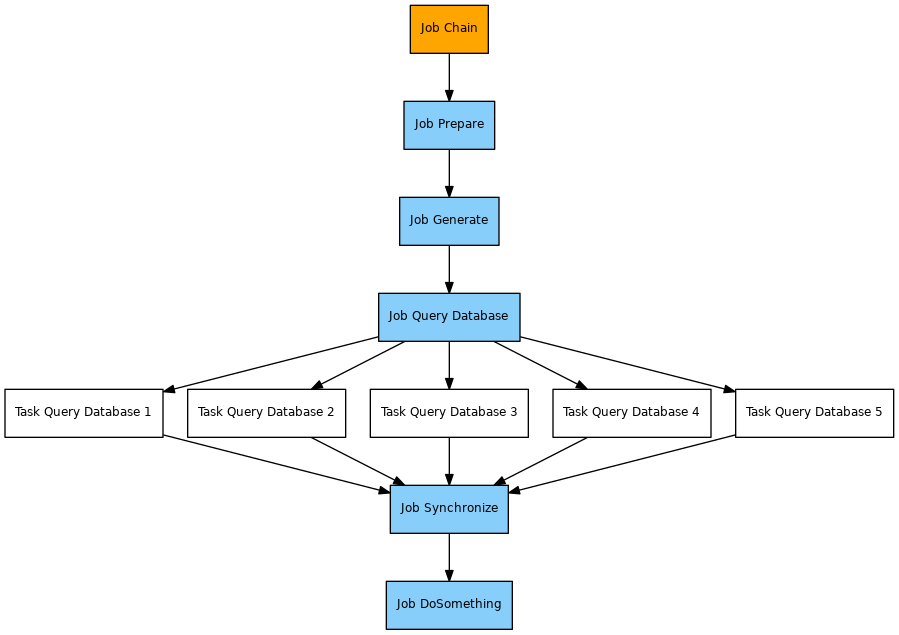
Implementation
Components
- The job chain provided by the sample is not specifiic for this solution, the same applies to the
queryjob.. - The
preparejob is used to dynamically calculate the number of parallel instances of thequeryjob. This job creates an order parameterparallel_executions=5for use with the subsequentgeneratejob. - The
generatejob implements the solution by creating the number of orders specified by theparallel_executionsparameter.- Each order is added the following parameters
number_of_orders: a copy of theparallel_executionsparameter.order_sequence: the sequence number of the order created. The sequence starts from 1 up to the value of theparallel_executionsparameter.synchronize_required_orders: the number of orders that thesynchronizejob waits for. This includes the value of theparallel_executionsparameter incremented by 1 for the main order. The prefixsynchronizeof the parameter name reflects the state that thesynchronizejob node is assigned in the job chain.
- The orders are assigned the state that is associated with the next job node, the
queryjob, i.e. the orders will be executed starting with that state. - The orders are assigned the end state that is associated with the
synchronizejob.
- Each order is added the following parameters
- The
queryjob is configured for a maximum number of 3 parallel tasks via the attribute<job tasks="3">. It could be configured for any number of parallel tasks. For the sake of this sample the limitation shows the behavior of the job to wait for processes to become free that could be assigned to subsequent orders for the same job. - The job
synchronizeis used to synchronize splitted orders and is provided by the Sync JITL Job with the Java classcom.sos.jitl.sync.JobSchedulerSynchronizeJobChainsJSAdapterClass.- This job is used without parameters.
- Hint: to re-use the
generatejob you can- store the job to some central folder and reference the job in individual job chains.
- move the JavaScript code of the job to come central location and use a corresponding
<include>element for individual job scripts.
Usage
- Add an order to job chain
parallel_executionby use of JOC. - Consider the processing that would
- split the execution into 5 subsequent orders that run for the
queryjob. - move the current order to the
synchronizejob node.
- split the execution into 5 subsequent orders that run for the
- The splitted orders for the
queryjob will arrive in thesynchronizejob node and will wait for all orders to be completed. With all splitted orders being completed the processing will continue with the jobdo_something.