Scope
- Use Case:
- Consider the situation where:
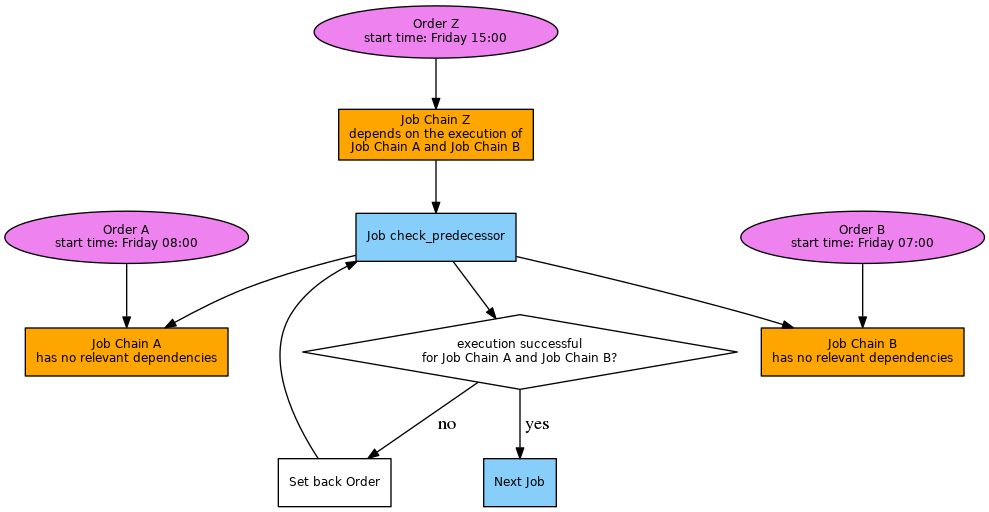
- A job chain is to start at a certain point in time and after an arbitrary number of other job chains have been completed successfully.
- The predecessor job chains run in an arbitrary sequence at arbitrary points in time.
- Example:
- Job chain Z runs after 2 other job chains A and B have completed.
Solution
- Download: final_chain_job_chain_history.zip
- Extract the archive to a folder in your JobScheduler installation named
./config/live. - The archive will extract the files to a sub-folder
final_chain_job_chain_history. - Note that you can store the sample files in any folder you like.
Pattern
Implementation
Components
- The solution contains three job chains:
job_chain_A and job_chain_B represent the predecessor job chains that have no relevant dependencies with job_chain_Z.job_chain_Z is the final job chain that checks if job_chain_A and job_chain_B have already been executed successfully.
- The solution implements a job
check_predecessor_job_chain_Z that has been added at the start of job_chain_Z.- This job makes use of a parameter
check_job_chains that is assigned a semicolon separated list of job chain names.- Job chain names can be specified with an absolute path (starting from the
live folder) or with a path relative to the directory of this job. - Example:
check_job_chains = job_chain_A;job_chain_B
- This job implements a
spooler_process() function that reads the parameters and checks the job cahin history for successful execution of the job chains specified by the parameter. - Should all checks for previous successful execution provide a positive result then the current order will be moved to the next job chain node. Otherwise the current order is set back and will be repeated regularly according to the setback configuration for this job.
Usage
- Positive Check
- Add an order to
job_chain_A using JOC's Add Order context menu.- The order should pass through the job chain without errors.
- Add an order to
job_chain_B using JOC's Add Order context menu.- The order should also pass through the job chain without errors.
- Add an order to
job_chain_Z using JOC's Add Order context menu.- The order should pass through the job chain without errors as all pre-conditions are met.
- Negative Check
- Modify the job
do_something_job_chain_A to include an error, e.g. by adding the command exit 1 as the final line in the job script. - Add an order to
job_chain_A:
- The order should proceed with an error.
- Add an order to
job_chain_Z- The order should proceed with an error that is visible in the order log. This error will state that the predecessor job did not complete successfully.
- The order will be set back and will be repeated according to the setback intervals that have been specified for the job
check_predecessor_job_chain_Z.
- Removing the modification to job
do_something_job_chain_A and adding an order to job_chain_A that then runs successfully should result in a successful run of job_chain_Z - either by a new order added to job_chain_Z or by the next execution of the previous order that has been set back.
See also
{"serverDuration": 124, "requestCorrelationId": "9f0a3233d139ee2a"}