This example shows a simple method to control job starts using time and file-based events. The logic behind this example is of a time event AND a file event.
Use this link to download the files: Process File Example.
Unpack the zip file in the JobScheudler live folder, where you will find the following JobScheduler objects:
- a job chain (
ProcessFile) - an order (
ProcessFile1) - a dummy job (
changeme) that symbolises the file processing.
You will also find two jobs in the "sos" sub-folder: JobChainStartJobChainEnd.
as well as two further jobs in the "jitl" sub-folder:DeleteFileExistsFile.
The time event(s) are set using the RunTime for the ProcessFile1 order. In the example this order will start once a day at 12:30. This can be changed as required. In XML the run_time settings looks like:
 <run_time  let_run="no">
     <period  single_start="12:30"/>
 </run_time>
The file whose presence is required (in this case c:\temp\ProcessFileTest.dat) is set as a parameter in the ProcessFile1 order:
 <params >
     <param  name="file" value="c:\temp\ProcessFileTest.dat"/>
 </params>
The "trick" lies in the ExistsFile job, which checks whether a file is present.
If the file is not present then this job will be restarted every minute up to a maximum of 30 times. If no file is found the order will end in error. If a file is found, JobScheduler will continue to process the job chain.
The XML for ExistsFile job is:
<?xml version="1.0" encoding="ISO-8859-1"?>
<job  title="Check and Wait for a file or files" order="yes" stop_on_error="no" name="ExistsFile">
    <settings >
        <log_level ><![CDATA[debug9]]></log_level>
    </settings>

    <description >
        <include  file="jobs/JobSchedulerExistsFile.xml"/>
    </description>

    <params />

    <script  language="java" java_class="sos.scheduler.file.JobSchedulerExistsFile"/>

    <delay_order_after_setback  setback_count="10" is_maximum="no" delay="00:01:01"/>
    <delay_order_after_setback  setback_count="30" is_maximum="yes" delay="0"/>

    <run_time />
</job>
This "polling" effect is realised using "setbacks". These are defined for both the ProcessFile job chain and for the ExistsFile job as shown in the next two JOE screen shots:
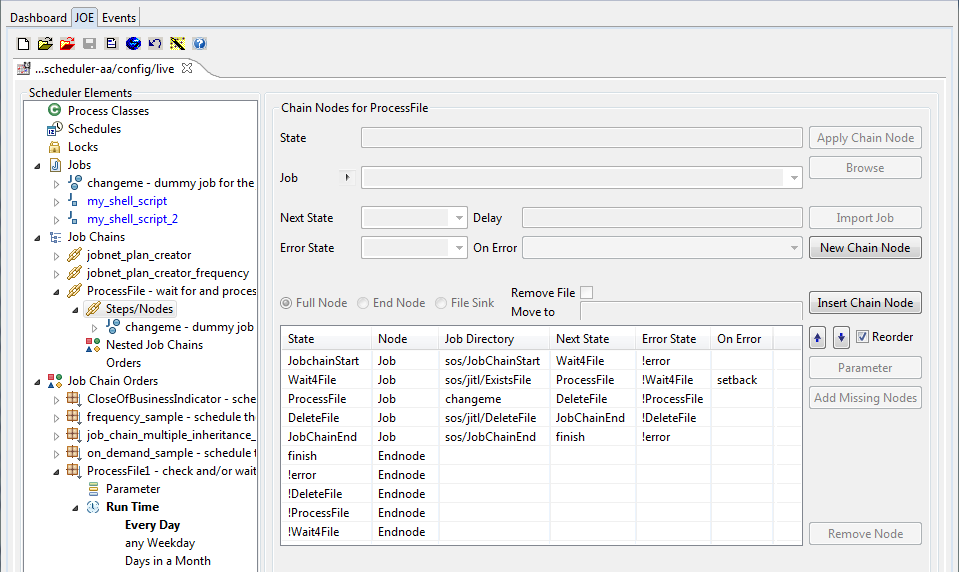
- Nodes in the "Process File" job chain showing the settings for the error handling and the "
ExistsFile" job setbacks.
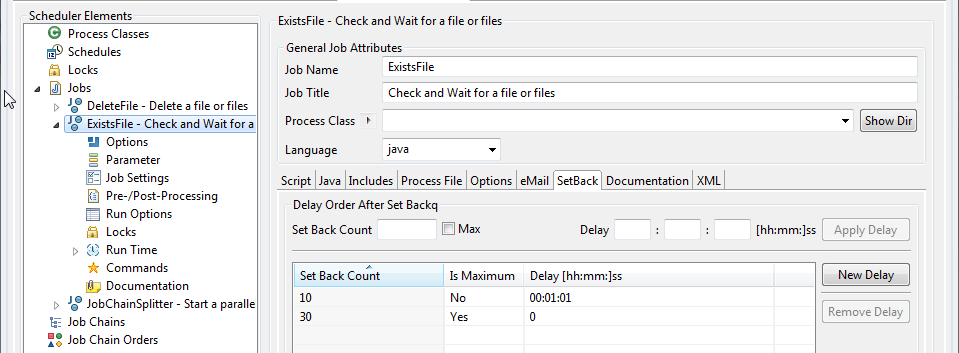
- SetBacks for the "ExistsFile" job showing the delay settings.
As the ExistsFile job can also start job chains, this could be carried out in two steps - which would perhaps be better for testing:
- First of all a job chain, which only consists of the
ExistsFilejob and then - a second job chain, which is started by the
ExistsFilejob, as soon as a file (or all files) are found. An order can then be started for each file: these orders then being carried out in parallel if required.