Controller Instance Start-up
Start Script: controller.sh, controller.cmd
The JS7 Controller includes a Start Script for managing the Controller instance:
- The default location of the Start Script is:
/opt/sos-berlin.com/js7/controller/<controller-id>/bin\controller.shon Unix andC:\Program Files\sos-berlin.com\js7\controller\<controller-id>\bin\controller.cmdon Windows.
- Use of the Start Script is authoritative to start Controller instances.
Usage
Running the Controller Start Script without arguments displays the usage clause:
Usage on Unix
Usage: controller.sh command [options] [switches]
  command:
    start           [options]
    start-container [options]
    stop            [options]
    restart         [options]
    status          [options]
    cancel          [options]
    switch-over     [options]
    revert          [options]
    cert            [cert-options]         | see https://kb.sos-berlin.com/x/jLbAAw
  options:
    --id=<identifier>                      | Controller ID, default: controller
    --http-port=<[interface:]port>         | http network interface and port, default: 4444
    --https-port=<[interface:]port>        | https network interface and port, default:
    --data-directory=<directory>           | default: /var/sos-berlin.com/js7/controller/var
    --config-directory=<directory>         | default: /var/sos-berlin.com/js7/controller/var/config
    --timeout=<seconds>                    | timeout for terminating Controller instance
    --java-options=<java options>          | default: -Xmx500m -Dfile.encoding=UTF-8; see https://kb.sos-berlin.com/x/uYo7B
    --watchdog=<path>                      | default: controller_watchdog.sh; see https://kb.sos-berlin.com/x/R7pfCQ
  switches:
    -f | --fail-over                       | fail-over active role on stop and restart
    -c | --curl                            | use curl instead of Java http client
    --watchdog-log-stdout                  | use stdout channel instead of watchdog.log file

see https://kb.sos-berlin.com/x/CKrAAw for more information.
Usage on Windows
Usage: controller.cmd command [options] [switches]
  command:
    start           [options]
    stop            [options]
    restart         [options]
    status          [options]
    cancel          [options]
    switch-over     [options]
    revert          [options]
    start-service   [options]
    install-service [options]
    remove-service  [options]
    cert            [cert-options]         | see https://kb.sos-berlin.com/x/jLbAAw
  options:
    --id=<identifier>                      | Controller ID, default: controller
    --http-port=<[interface:]port>         | http network interface and port, default: 4444
    --https-port=<[interface:]port>        | https network interface and port, default:
    --data-directory=<directory>           | default: C:\ProgramData\sos-berlin.com\js7\controller\controller
    --config-directory=<directory>         | default: C:\ProgramData\sos-berlin.com\js7\controller\controller\config
    --timeout=<seconds>                    | timeout for terminating Controller instance
    --java-options=<java options>          | default: -Xmx500m -Dfile.encoding=UTF-8; see https://kb.sos-berlin.com/x/uYo7B
    --watchdog=<path>                      | default: controller_watchdog.cmd; see https://kb.sos-berlin.com/x/R7pfCQ
  switches:
    -f | --fail-over                       | fail-over active role on stop and restart
    -c | --curl                            | use curl instead of Java http client
    --watchdog-log-stdout                  | use stdout channel instead of watchdog.log file

see https://kb.sos-berlin.com/x/CKrAAw for more information.
Command Line Options
- --id
- Specifies a unique identifier for a Controller. Identifiers such as "controller-test", "controller-production" etc. can be used. Upper case and lower case characters are considered, the characters a-z, A-Z, 0-9, underscore and hyphen are allowed. Spaces are not allowed in a Controller ID. Default:
controller. - If users intend to operate a Controller Cluster with two Controller instances for the active and for the standby cluster member, then the same Controller ID must be specified for both Controller instances as otherwise the instances will not be considered to be members of the same cluster.
- Specifies a unique identifier for a Controller. Identifiers such as "controller-test", "controller-production" etc. can be used. Upper case and lower case characters are considered, the characters a-z, A-Z, 0-9, underscore and hyphen are allowed. Spaces are not allowed in a Controller ID. Default:
- --http-port
- Specifies the HTTP port which the Controller instance is listening to in order to receive requests from JOC Cockpit or a partnering Controller instance in a cluster.
The option can be used to indicate which network interface the JS7 Controller should listen to if a hostname or IP address is specified - for example with
--http-port=myhost:4444.- When the option is not used the port defaults to
4444and the Controller listens to all available network interfaces.
- If a port is specified then the following order of precedence applies:
- First precedence: command line option
- Second precedence: environment variable
JS7_CONTROLLER_HTTP_PORT(see below) - Third precedence: use of default value
- Specifies the HTTP port which the Controller instance is listening to in order to receive requests from JOC Cockpit or a partnering Controller instance in a cluster.
--https-port- Specifies the HTTPS port that the Controller is listening to in order to receive requests from JOC Cockpit or a pairing Controller instance in a cluster:
The option can be used to indicate which network interface the Controller should listen to if a hostname or IP address is specified - for example with
--https-port=myhost:4443.- When using the HTTPS protocol for connections from JOC Cockpit and from a pairing Controller instance the the HTTP protocol has to be allowed for local connections such as
--http-port=localhost:4444. As the Controller Start Script uses an HTTP connection the protocol has to be in place to allow the Controller instance to be started, stopped etc. by its Start Script.
- If a port is specified then the following order of precedence applies:
- First precedence: command line option
- Second precedence: environment variable
JS7_CONTROLLER_HTTPS_PORT(see below) - Third precedence: use of default value
- Specifies the HTTPS port that the Controller is listening to in order to receive requests from JOC Cockpit or a pairing Controller instance in a cluster:
--data-directory- Specifies the location of the data directory that usually includes the
config,logsandstatesub-directories. - If a data directory is specified then the following order of precedence applies:
- First precedence: command line option
- Second precedence: environment variable
JS7_CONTROLLER_DATA(see below) - Third precedence: use of default value
JS7_CONTROLLER_HOME\var
- Specifies the location of the data directory that usually includes the
--config-directory- Specifies the location of the
configdirectory for configuration data. - If a configuration directory is specified then the following order of precedence applies:
- First precedence: command line option
- Second precedence: environment variable
JS7_CONTROLLER_CONFIG_DIR(see below) - Third precedence: use of default value
JS7_CONTROLLER_DATA/config
- Specifies the location of the
--timeoutWith the
stopcommand this option waits for the indicated number of seconds and terminates the Controller if the timeout is exceeded.- When using JS7 - systemd Service Files for automated Startup and Shutdown with Unix Systems users should consider that the
--timeoutvalue will count towards the systemd service file'sTimeoutStopSecsetting. Users must ensure that the Controller is terminated when the systemd timeout is exceeded.
--java-options- This option can be used to apply Java options for the Controller, e.g. for memory settings, see JS7 - FAQ - Which Java Options are recommended.
Without this option being used Java options default to
-Xms500m.- In order to specify a number of Java options quotes have to be used like this:
--java-options="-Xms500m -Xmx1g"
When specifying Java options then the following order of precedence applies:
- First precedence: command line option
- Second precedence: environment variable
JAVA_OPTIONS(see below) - Third precedence: use of default value
--watchdog- Optionally specifies the path to a customized implementation of the
controller_watchdog.shWatchdog Script, see JS7 - Controller Watchdog. Users who wish to start the Controller using their own Java classes, for example for monitoring purposes, can implement a replacement script that will be called by thecontroller.sh|.cmdstart script. - The option is available starting from release 2.7.4.
- Optionally specifies the path to a customized implementation of the
Switches
-c , --curl- Specifies that the
curlutility should be used instead of the built-in HTTP client when sending commands to the Controller.
- Specifies that the
-f, --fail-overWith the
stopandrestartcommands this option will fail-over the active role to the Standby Controller instance.- The switch is available starting from release 2.7.2.
--watchdog-log-stdout- Specifies that log output to stdout and stderr channels will not be redirected to a file. By default log output to stdout and stderr channels is redirected to the
watchdog.logfile. - The switch is available starting from release 2.7.2.
- Specifies that log output to stdout and stderr channels will not be redirected to a file. By default log output to stdout and stderr channels is redirected to the
Watchdog Script: controller_watchdog.sh, controller_watchdog.cmd
Technically the Controller is started and is restarted from its Watchdog Script, for details see JS7 - Controller Watchdog.
Instance Start Script: controller_instance.sh, controller_instance.cmd
The JS7 Controller includes a template file for an Instance Start Script which can be modified to specify start-up parameters.
- The Instance Start Script sets a number of environment variables and then executes the Start Script.
- Users can adjust start-up parameters from environment variables in the Instance Start Script as described below.
It is recommended that an individual Instance Start Script is created from the template file as this allows individual start-up parameters to be specified using environment variables.
Location
- The default location of the Instance Start Script template file is:
/opt/sos-berlin.com/js7/controller/<controller-id>/bin/controller_instance.sh-exampleon Unix andC:\Program Files\sos-berlin.com\js7\controller\<controller-id>\bin\controller_instance.cmd-exampleon Windows.
- Users can create a copy of the template file and remove the
-exampleextension from the file name. The renamed Instance Start Scriptcontroller_instance.sh(Unix) orcontroller_instance.cmd(Windows) will not be overwritten when updating the Controller later on.- If the Controller installation is performed on Windows using the installer, either in headless mode or in graphical mode, then the installer automatically creates the script.
- If the Controller installation is performed by extracting a .tar.gz/.zip archive then the Instance Start Script has to be created from a copy of the template file.
- Once the Instance Start Script been copied users can modify start-up parameters from environment variables, as described below.
Usage
The Instance Start Script can be executed with the same arguments as the Start Script as described above.
Controller Environment Variables
Most environment variables in the Instance Start Script correspond to command line options in the Start Script (explained above). The following environment variables can be adjusted in the script:
JS7_CONTROLLER_ID- The unique identifier of a Controller. Identifiers such as "controller-test", "controller-production" etc. can be used. Upper case and lower case characters are considered, the characters a-z, A-Z, 0-9, underscore and hyphen are allowed. Spaces are not allowed in a Controller ID.
- If a Controller Cluster is operated with two Controller instances for the active and for the standby cluster member, then the same Controller ID must be specified for both Controller instances, as otherwise the instances will not be considered members of the same cluster. This identifier cannot be modified after initial start of a Controller. Changes to the Controller ID require dropping the Controller's journal, i.e. the contents of its
JS7_CONFIG_DIR\statedirectory. - Corresponding command line option:
--id
JS7_CONTROLLER_USER- The operating system user account that the Controller instance is started with. The Controller Start Script will switch to this account when being executed from a different account, for example if started by the
rootaccount. - There is no corresponding command line option.
- The operating system user account that the Controller instance is started with. The Controller Start Script will switch to this account when being executed from a different account, for example if started by the
JS7_CONTROLLER_HTTP_PORT- The HTTP port that the JS7 Controller is listening to.
- This setting optionally indicates which network interface the JS7 Controller should listen to if a host or IP address is specified such as
JS7_CONTROLLER_HTTP_PORT=myHost:4444. - If only a port number is specified then the JS7 Controller listens to all available network interfaces via HTTP.
- Without setting this environment variable the port defaults to
4444. - Corresponding command line option:
--http-port
JS7_CONTROLLER_HTTPS_PORT- Sets the HTTPS port that the JS7 Controller is listening to.
- This setting indicates which network interface the JS7 Controller should listen to if a host or IP address is specified as for example with
JS7_CONTROLLER_HTTPS_PORT=myHost:4443 - If a port number only is specified then the JS7 Controller listens to all available network interfaces via HTTPS.
- When using the HTTPS protocol for connections from JOC Cockpit and from a paired Controller instance then the HTTP protocol has to be allowed for local connections such as
JS7_CONTROLLER_HTTP_PORT=localhost:4444. As the Controller Start Script makes use of an HTTP connection this protocol has to be in place to allow the Controller instance to be started, stopped etc. by its Start Script. - The HTTPS protocol is not used if this environment variable is not set.
- Corresponding command line option:
--https-port
JS7_CONTROLLER_DATA- Points to the parent directory where the JS7 Controller finds its configuration data, log data and journals.
- Without setting this environment variable the default value is
JS7_CONTROLLER_HOME\var. - For Windows systems where the JS7 Controller is installed in the program directory this is indicated by the
%ProgramFiles%system environment variable. It is recommended that the default setting is not used. Instead a different path should be specified via theJS7_CONTROLLER_DATAenvironment variable, such as a location in the system data directory that is indicated by the%ProgramData%environment variable, for example,JS7_CONTROLLER_DATA=C:\ProgramData\sos-berlin.com\js7\controller. - Corresponding command line option:
--data-directory
JS7_CONTROLLER_CONFIG_DIR- Specifies the directory where configuration files are stored.
- When this environment variable is not specified, the default value of
JS7_CONTROLLER_DATA/configwill be used. - Corresponding command line option:
--config-directory
JS7_CONTROLLER_LOGS- Specifies the directory where the JS7 Controller log files are created.
- This setting defaults to the
JS7_CONTROLLER_DATA/logsdirectory. - There is no corresponding command line option.
JS7_CONTROLLER_PID_FILE_DIR- Sets the directory where the JS7 Controller PID file is created.
- This setting defaults to the directory which is specified with the
JS7_CONTROLLER_LOGSenvironment variable or the log directory default value. - There is no corresponding command line option.
JS7_CONTROLLER_PID_FILE_NAME- Sets the file name to which the JS7 Controller stores its PID.
- The default value is
controller.pid. - There is no corresponding command line option.
- FEATURE AVAILABILITY STARTING FROM RELEASE 2.5.1
JS7_CONTROLLER_TZ- Specifies the Controller's time zone that is used for example for timestamps in log output.
- For the list of available TZ time zone values see https://en.wikipedia.org/wiki/List_of_tz_database_time_zones.
JS7_CONTROLLER_WATCHDOG- Specifies the path to a customized implementation of the
controller_watchdog.shWatchdog Script, see JS7 - Controller Watchdog. Users who wish to start the Controller using their own Java classes, for example for monitoring purposes, can implement a replacement script that will be called by thecontroller.sh|.cmdstart script. - Corresponding command line option:
--watchdog - The environment variable is considered starting from release 2.7.4.
- Specifies the path to a customized implementation of the
JAVA_HOME- Points to the location of the JVM, either a JRE (Java Runtime Environment) or JDK (Java Development Kit).
- Without setting this environment variable Java will be used from the location specified by the system path.
- The
JAVA_HOMEenvironment variable does not necessarily point to the location of a JDK but to a JRE directory where thebin/javaexecutable resides, for example if the location of the Java executable is/opt/java/jdk8u202-b08/jre/bin/javathenJAVA_HOME=/opt/java/jdk8u202-b08/jre. - There is no corresponding command line option.
JAVA_OPTIONS- Specifies Java options, for example the Java memory settings for the Controller instance.
- When this environment variable is not set, the Java options will default to
-Xms500m. - Corresponding command line option:
--java-options
Running the Controller Instance
- SOS does not recommend running the JS7 Controller as the
rootaccount (for Unix) or as theAdministratoraccount (for Windows) for a simple reason: there is no need to do so. - The Controller does not execute any jobs as this task is performed by Agents. Therefore any user account can be used to operate the Controller.
The examples below make use of a controller_instance.sh (Unix) or controller_instance.cmd (Windows) Instance Start Script which is created from the template file.
Starting the Controller Instance
controller_instance.sh|.cmd start [options]
When used for Container operation using Unix OS then the following command is used:
controller_instance.sh start-container [options]
The command is used to start the JS7 Controller in a container:
- The command will keep the start script running as PID 1 in order to receive later stop/kill signals (SIGTERM, SIGKILL) from the container management software.
- The command
start-dockeris an alias forstart-container. - SET-223 - Getting issue details... STATUS
Stopping the Controller Instance
# terminate Controller instance
controller_instance.sh|.cmd stop [options]

# wait up to 60s to stop Controller instance
controller_instance.sh|.cmd stop --timeout=60

# stop active Controller instance and fail-over active role
controller_instance.sh|.cmd stop --fail-over
The command will terminate the Controller.
- If a Controller instance will take time to terminate, then the command will wait accordingly. If a Controller Cluster is operated, then fail-over will not occur.
- Using the
--fail-overswitch when terminating an active Controller instance will fail-over the active role to the Standby Controller instance in a Controller Cluster. - Using the
--timeoutoption will terminate the Controller instance when the number of seconds specified is exceeded.- No fail-over will occur if the Controller terminates within the given timeout.
- Fail-over will occur if the Controller does not terminate within the given timeout.
- If the
--fail-overswitch is used then the--timeoutoption will be ignored.
controller_instance.sh|.cmd abort [options]
The Controller process is aborted immediately.
If a Controller Cluster is operated then the command will cause fail-over.
Starting from release 2.7.2 the command is deprecated and is replaced by the stop command using the --fail-over switch.
controller_instance.sh|.cmd cancel | kill [options]
The Controller process is forcibly terminated. The command kill can be used as an alias to cancel.
The command corresponds to sending a SIGKILL signal with an OS command such as kill -9 (Unix) or taskkill (Windows).
If a Controller Cluster is operated then the command will cause fail-over.
Restarting the Controller Instance
# restart Controller instance
controller_instance.sh|.cmd restart [options]

# wait up to 60s and restart Controller instance
controller_instance.sh|.cmd restart --timeout=60

# fail-over active role and restart Controller instance
controller_instance.sh|.cmd restart --fail-over
The Controller process is stopped and is started:
- The Controller is stopped as explained in chapter Stopping the Controller Instance. This includes handling of fail-over in a Controller Cluster.
- The Controller is started similar to use of the
startcommand using the same options as for initial start.
If the --fail-over switch is used then the --timeout option will be ignored.
Checking the Controller Instance Status
controller_instance.sh|.cmd status [options]
If the Controller instance is up and running then the command will result in output such as:
id: controller
version: 2.0.0-alpha.20210706 (2021-07-06)
buildId: KvsbZFR9QfOT-GAJg33fLA
startedAt: 1625646518935
totalRunningTime: 632857.312
orderCount: 1973
system:
  hostname: KA0054
  cpuModel: Intel64 Family 6 Model 94 Stepping 3, GenuineIntel
  mxBeans:
    operatingSystem:
      availableProcessors: 4
      systemLoadAverage: -1
java:
  version: 1.8.0_171
  memory:
    maximum: 501743616
    total: 501743616
    free: 420687192
  systemProperties:
    java.vendor: Oracle Corporation
    os.arch: amd64
    java.runtime.name: Java(TM) SE Runtime Environment
    os.version: '10.0'
    os.name: Windows 10
    java.vm.name: Java HotSpot(TM) 64-Bit Server VM
    java.version: 1.8.0_171
If the Controller is not running then output is created like this:
ERROR: java.nio.file.NoSuchFileException: C:\ProgramData\sos-berlin.com\js7\controller\controller\state\session-token
...JS7 Controller(controller) not started!
Switching-over the Active Controller Instance
controller_instance.sh|.cmd switch-over [options]
If a Controller Cluster is operated then the command will switch the active role from the Active Controller instance to the Standby Controller instance. The command can be executed for the Active Controller instance only.
After switch-over the Controller instance is restarted.
Reverting a Controller Cluster to a Standalone Controller
controller_instance.sh|.cmd revert [options]
If a Controller Cluster is operated then the command can be executed after the Controller is stopped. The command will revert the Controller Cluster to a Standalone Controller instance.
For details see JS7 - How to revert a Controller Cluster to a Standalone Controller.
Performing Certificate Rollout
controller_instance.sh|.cmd cert [cert-options]
The command is used to generate an SSL/TLS Certificate for client and server authentication.
For details and command line options see JS7 - Certificate Authority - Rollout Certificates for HTTPS Connections
Windows Service Interface
The following information applies to headless installation on Windows systems. For installation with a GUI and user dialog see JS7 - Controller - Installation Using the Windows Graphical Installer.
The Controller can be operated as a Windows Service. The Start Script of the Controller instance allows installation/removal of the Windows Service.
The examples below make use of an controller_instance.cmd Instance Start Script that is created from the template file.
Installing the Windows Service
controller_instance.cmd install-service [--http-port=<number>]
The command installs the Controller instance's Windows Service. After the installation, users find the Windows Service with the name SOS JS7 Controller -id=<Controller ID> in the Services Manager Console. The Windows Service uses the local system account.
During service installation, it tries to copy the executable file for the Windows Service to the .\service directory. This operation could fail with the error "Access denied" if the JS7 Controller has been extracted, for example, to C:\Program Files\. In this case, users can change the permissions of the .\service directory or open the command prompt with elevated administrator rights and execute the above command once more.
Starting the Windows Service
controller_instance.cmd start-service [--http-port=<number>]
The command starts the Windows Service with the name SOS JS7 Controller -id=<controller-id>.
The stop command checks if the Controller instance was started by the command line interface or as a Windows Service and stops the Controller instance accordingly. Therefore there is no stop-service command.
Removing the Windows Service
controller_instance.cmd remove-service [--http-port=<number>]
The command removes the Windows Service. After executing this command users should no longer find the Windows Service with the name SOS JS7 Controller -id=<controller-id> in the Services Manager Console.
Configuring the Windows Service
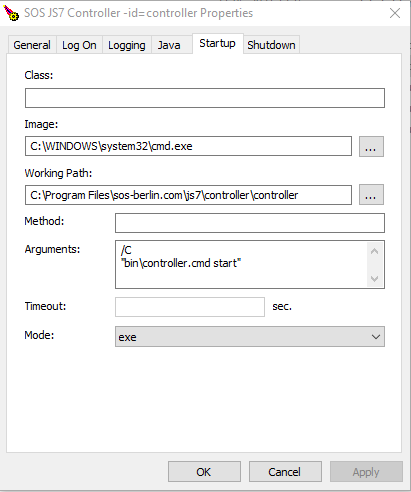
The .\service\js7_controller_<controller-id>w.exe file is installed along with the Windows Service. This program can be executed to configure the Windows Service.
| For example, go to the "Startup" tab |
Debugging the Windows Service
- For general information see JS7 - Log Levels and Debug Options.
- The Controller instance log level can be increased using the Controller's Apache ProcRun Daemon Service Manager daemon/service. On Windows systems this is installed in the Controller instance's
servicefolder with a name such asjs7_controller_<controller-id>w.exewhere<controller-id>is the unique Controller ID. - Users can start the ProcRun Manager, select the Logging tab in the user interface and set the level to Debug.
- For the location of log files see JS7 - Log Files and Locations.
- Users should consider reverting the log level back to its original value once they are finished with debugging.
Overview
Content Tools